
Written by Rami Salem, Quantitative Risk Management specialist with 15+ years of experience across Oil & Gas, EPC/EPCM, and infrastructure mega-projects.
Your Monte Carlo simulation ran 10,000 iterations. The S-curve looks tight, the P80 looks manageable, and the stakeholders are happy. But there is a problem: if you did not model correlation between your risk variables, your results are almost certainly too optimistic. The model is telling you what you want to hear, not what is likely to happen.
Correlation in risk models is the statistical relationship between risk variables that causes them to move together. When one risk increases, correlated risks tend to increase too. Ignoring this relationship produces an artificially narrow S-curve that understates the true spread of possible outcomes. IQRM considers correlation modeling one of the most critical (and most frequently skipped) steps in any Quantitative Schedule Risk Analysis (QSRA) or Quantitative Cost Risk Analysis (QCRA).
This guide explains what correlation does to your Monte Carlo results, how to set defensible correlation coefficients, and why your current model is probably lying to you if correlation is set to zero.
What Correlation Means in a Monte Carlo Simulation
In a Monte Carlo simulation, each risk variable is sampled independently by default. The simulation engine picks a random value for Risk A, then a completely separate random value for Risk B, with no relationship between the two draws.
This "zero correlation" assumption means the model treats every risk as if it exists in isolation. In a single iteration, one risk might sample high while another samples low, and they cancel each other out. Across thousands of iterations, this cancellation effect compresses the total distribution. The result is an S-curve that is narrower than reality.
What correlation does: It forces related variables to move in the same direction during each iteration. If Risk A samples high, Risk B (which is correlated with Risk A) also tends to sample high. This eliminates the artificial cancellation and widens the S-curve to reflect what actually happens on projects.
The mathematical effect is significant. On a typical EPC project with 30 to 50 risk variables, adding realistic correlation (0.3 to 0.7 between related risks) can widen the P10-P90 range by 20% to 40%. That means the difference between P50 and P80 grows substantially, and so does the contingency required to reach your target confidence level.
Why Zero Correlation Is Almost Never Realistic
Think about how risks actually behave on your project:
Contractor performance is correlated. If a contractor is underperforming on structural steel erection, they are very likely underperforming on piping installation too. The root cause is the same: workforce quality, supervision gaps, or equipment problems. These are not independent events.
Supply chain risks are correlated. If global steel prices spike, they affect every steel-dependent procurement item simultaneously. A logistics disruption at a major port delays multiple equipment deliveries, not just one.
Weather affects everything at once. An unusually harsh monsoon season does not selectively delay one activity. It slows earthworks, concrete pours, structural erection, and external piping all at the same time.
Regulatory changes are correlated. A government tightening environmental permitting requirements does not affect one permit in isolation. Every environmental approval on the project faces the same new scrutiny.
In every one of these cases, treating the risks as independent (zero correlation) produces a model where delays on one activity are offset by better-than-expected performance on another. That offsetting rarely happens in reality. When things go wrong on a project, they tend to go wrong together.
Key insight: The default correlation in most Monte Carlo tools is zero. This means that unless you deliberately add correlation, your model is assuming complete independence between all risks. That assumption is almost never valid.
How Much Does Correlation Change the Results?
Here is a simplified example from an IQRM project review on a GCC petrochemical project.
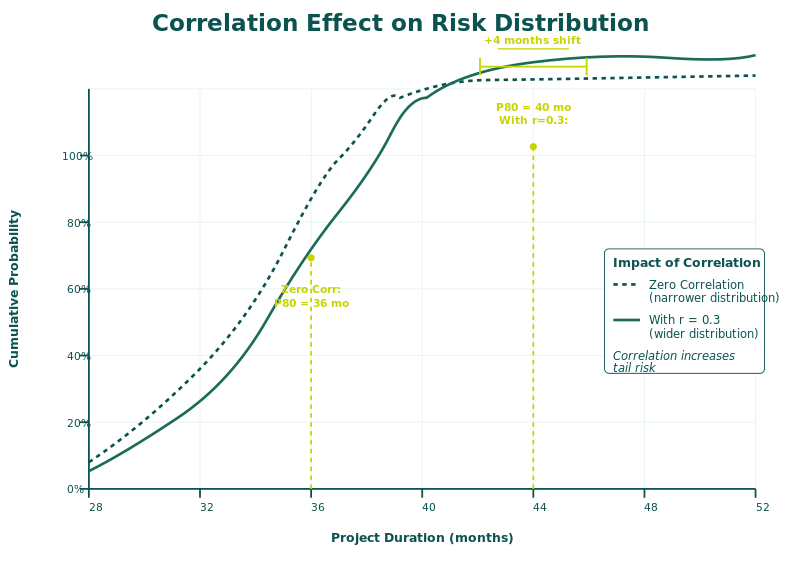
The project had 40 risk variables modeled in Safran Risk. The team ran the simulation twice: once with zero correlation, and once with moderate correlation (0.5) applied between logically related risks within the same contractor group, supply chain, and geographic exposure.
| Metric | Zero Correlation | With Correlation (0.5) | Difference |
|---|---|---|---|
| P50 Finish Date | Month 28 | Month 29 | +1 month |
| P80 Finish Date | Month 30 | Month 33 | +3 months |
| P90 Finish Date | Month 31 | Month 36 | +5 months |
| P10-P90 Range | 6 months | 11 months | +83% wider |
| Schedule Contingency (P80) | 4 months | 7 months | +75% more |
The P50 barely moved because the central tendency is less affected. But the tails, especially the P80 and P90 that executives use for contingency decisions, shifted dramatically. The project needed 75% more schedule contingency to reach the same P80 confidence level.
This is not an unusual result. IQRM consistently sees correlation adding 2 to 5 months of contingency requirement on large EPC projects. The exact impact depends on the number of correlated variables and the strength of the correlation coefficients.
Correlation Coefficient Guidelines
Correlation is expressed as a Pearson coefficient ranging from -1 to +1. Here is how IQRM recommends setting these values:
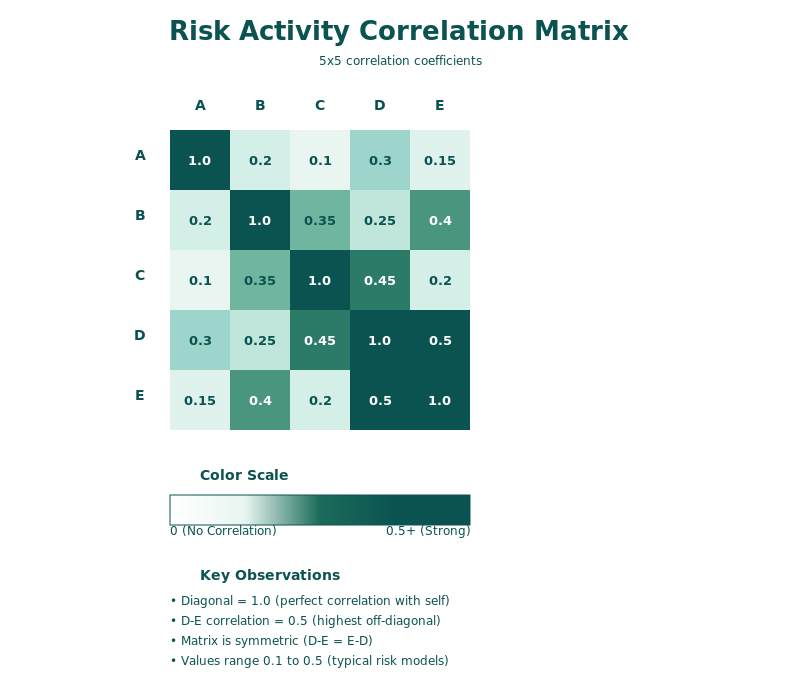
| Relationship | Coefficient | When to Apply |
|---|---|---|
| Strong positive (0.7 to 1.0) | 0.8 typical | Same contractor performing multiple scopes; same supplier for multiple items; same permit authority |
| Moderate positive (0.4 to 0.7) | 0.5 typical | Same trade discipline across different contractors; similar materials from different suppliers; weather-sensitive activities in the same season |
| Weak positive (0.1 to 0.4) | 0.3 typical | Loosely related activities in the same project phase; general market conditions affecting different cost categories |
| Zero (0) | 0.0 | Genuinely independent risks with no logical connection |
Practical Rules for Setting Correlation
Rule 1: Group by root cause. Risks that share the same root cause should be correlated. If two procurement delays are caused by the same supplier's capacity constraints, correlate them at 0.7 to 0.8.
Rule 2: Group by contractor. All activities performed by the same contractor should have correlated duration uncertainties. A contractor who is slow on one scope is likely slow on all scopes. Use 0.5 to 0.7.
Rule 3: Group by geography. Site-specific conditions (weather, labor availability, logistics access) affect all activities on the same site. Use 0.3 to 0.5 for activities sharing the same geographic exposure.
Rule 4: Document everything. Every correlation coefficient must have a written justification. "We applied 0.6 correlation between all piping activities because they share the same subcontractor and material supply chain" is defensible. An undocumented correlation matrix is not.
Rule 5: When in doubt, use moderate correlation (0.5). This is better than zero, which is almost certainly wrong. You can refine later with more data.
Common Mistakes in Correlation Modeling
Mistake 1: Leaving correlation at zero. The most common and most damaging error. It produces falsely tight S-curves that understate risk and lead to inadequate contingency.
Mistake 2: Applying blanket correlation to everything. Correlating every variable with every other variable at the same coefficient is lazy and distorts the model. Risks should only be correlated when a logical relationship exists.
Mistake 3: Using Single Pass sensitivity with correlated models. Single Pass sensitivity analysis tests each variable independently, which ignores correlation effects entirely. If your model has significant correlation, use Multiple Pass sensitivity to capture interaction effects. The tornado chart from Single Pass will understate the impact of correlated risk groups.
Mistake 4: Correlating discrete risk events incorrectly. Correlation between discrete risk events is different from correlation between continuous uncertainties. Two discrete events (each with their own probability) can be correlated, meaning if one occurs the other is more likely to occur. But the implementation in most tools requires careful setup. Consult the Safran Risk or Argo documentation for the correct method.
Mistake 5: Not running sensitivity on correlation assumptions. Run your model with and without correlation and present both S-curves. This shows decision-makers exactly how much correlation contributes to the risk profile. If the difference is small, correlation may not be critical for that model. If the difference is large (and it usually is), correlation is a key driver that must be properly calibrated.
How to Present Correlation Impact to Stakeholders
Most executives do not need to understand Pearson coefficients. They need to understand the consequence of ignoring correlation.
IQRM recommends presenting the dual S-curve overlay:
Step 1: Run the model with zero correlation and record the P80.
Step 2: Run the model with realistic correlation and record the P80.
Step 3: Overlay the two S-curves on the same chart.
Step 4: Highlight the gap at P80: "With independent risks, P80 is Month 30. With realistic correlation, P80 is Month 33. This 3-month difference is the risk we would miss if we assumed all risks were independent."
This visual makes the case immediately. The narrow S-curve (zero correlation) looks artificially confident. The wider S-curve (with correlation) looks more honest. Executives can see the gap and understand why contingency needs to increase.
For a detailed guide on reading S-curves and choosing between P50, P80, and P90 confidence levels, see IQRM's guide on P50 vs P80 vs P90: How to Choose the Right Confidence Level.
To understand how sensitivity analysis identifies which correlated risk groups are driving the most schedule variance, see IQRM's guide on Sensitivity Analysis and Tornado Charts in Schedule Risk.
Frequently Asked Questions
What is correlation in Monte Carlo simulation?
Correlation in Monte Carlo simulation is the statistical relationship between risk variables that causes them to move together during each iteration. Positive correlation means when one variable samples high, correlated variables also tend to sample high. This widens the overall distribution and produces more realistic risk estimates than the default assumption of independence.
Why does ignoring correlation understate risk?
When correlation is zero, the simulation engine samples each variable independently. In any given iteration, some variables will randomly sample high while others sample low, creating an artificial cancellation effect. This compresses the S-curve and makes the project look less risky than it actually is. Real projects do not benefit from this cancellation because risks tend to move together.
What correlation coefficient should I use?
IQRM recommends starting with moderate positive correlation (0.5) for risks that share a logical relationship such as the same contractor, supplier, or geographic exposure. Use strong correlation (0.7 to 0.8) when risks share a direct causal link. Use zero only when risks are genuinely independent with no logical connection.
How do I know if correlation matters for my project?
Run your Monte Carlo model twice: once with zero correlation and once with realistic correlation applied to logically related risk groups. Compare the P80 values. If the difference is more than 5% of the total project duration, correlation is a significant factor that must be properly modeled.
Does Safran Risk support correlation?
Yes. Safran Risk supports Pearson correlation coefficients between risk variables. You can apply correlation between estimated uncertainties (BAU), between discrete risk events, and between uncertainties and discrete events. The correlation matrix is configured in the risk model setup before running the simulation.
Can correlation be negative?
Yes, but negative correlation (where one variable increases as another decreases) is rare in project risk modeling. It is more common in financial portfolio analysis. In project contexts, most risk correlations are positive because adverse conditions tend to affect multiple areas simultaneously.
If your team's Monte Carlo models assume zero correlation between risks, your contingency estimates are almost certainly too low. IQRM's QRM Professional Diploma teaches practitioners how to build properly correlated risk models, calibrate correlation coefficients from project data, and present the impact to decision-makers in a way that drives better contingency decisions.
IQRM is a specialist institute for Quantitative Risk Management, delivering Quantitative Schedule Risk Analysis (QSRA), Quantitative Cost Risk Analysis (QCRA) and Monte Carlo simulation training and consulting to major capital projects across the United Kingdom, Saudi Arabia and the UAE.
QRM Training
Consulting
Knowledge Hub
QSRA on UK Major Projects
United Kingdom
QSRA & QCRA training and consulting for UK infrastructure, nuclear and energy programmes.
QSRA Training UK
rs@iqrm.net
United Arab Emirates
Rolex Tower, Sheikh Zayed Road, Dubai
+971 50 362 5784
QSRA Training UAE
Saudi Arabia
Riyadh delivery for giga-projects and Vision 2030 programmes.
QSRA Training Saudi Arabia
rs@iqrm.net