
Written by Rami Salem, Quantitative Risk Management specialist with 15+ years of experience across Oil & Gas, EPC/EPCM, and infrastructure mega-projects.
You ran your Monte Carlo simulation. The S-curve says P80 is 14 months. But which risks are actually causing that? Where should you spend your mitigation budget? Without sensitivity analysis, your QSRA is a black box: it tells you how much risk you have, but not where it lives.
Sensitivity analysis in schedule risk is the process of measuring how much each individual risk or activity contributes to the total schedule variance in a Monte Carlo simulation. It produces a tornado chart that ranks risk drivers from highest to lowest impact, telling you exactly where to focus mitigation for maximum schedule recovery. IQRM considers sensitivity analysis the most actionable output of any Quantitative Schedule Risk Analysis (QSRA), because it converts a probability distribution into a prioritized action list.
This guide explains how tornado charts work in schedule risk analysis, how to read them correctly, and how to use the results to make defensible mitigation decisions that shorten your project timeline.
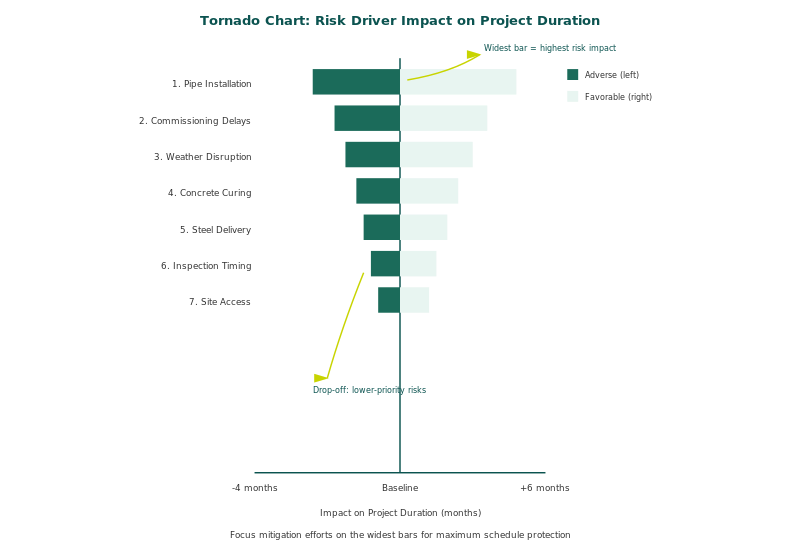
Figure 1: Tornado chart example showing how sensitivity analysis ranks schedule risk drivers by their impact on project completion date
What Is a Tornado Chart in Schedule Risk Analysis?
A tornado chart is a horizontal bar chart that ranks how many days (or weeks) of delay each risk or activity contributes to the total schedule variance. The bars are sorted from largest impact at the top to smallest at the bottom, creating the distinctive "tornado" shape.
In a QSRA context, the tornado chart is generated through sensitivity analysis after the Monte Carlo simulation completes. The simulation engine tests each variable (risk event or activity duration uncertainty) to determine its individual contribution to the overall finish date spread.
How the Calculation Works
The most common method is Single Pass sensitivity analysis. The simulation engine holds all variables at their expected values except one, then varies that single variable across its full range. The resulting change in the project finish date is that variable's contribution. This process repeats for every variable in the model, producing the ranked tornado chart.
Multiple Pass sensitivity is more sophisticated. It considers interactions between variables and produces more accurate results when risks are correlated. IQRM recommends Multiple Pass for complex models where correlation is significant.
Key insight: The top 5 to 10 risk drivers in a tornado chart typically account for 60-80% of the total schedule variance. This means your mitigation effort should concentrate on a small number of high-impact items, not spread across dozens of minor risks.
How to Read a Tornado Chart: A Step-by-Step Interpretation
Reading a tornado chart is straightforward once you understand what each element represents.
Step 1: Identify the Scale
The x-axis shows the impact in days (or the relevant time unit). Each bar length represents that variable's contribution to the total finish date spread.
Step 2: Read from Top to Bottom
The top bar is the single largest risk driver. In a well-constructed QSRA model, this might show something like "Procurement delay for long-lead equipment: 18 days." That means this one risk alone contributes 18 days to the gap between the best-case and worst-case finish date.
Step 3: Look for the Drop-Off Point
There is usually a clear break between the major drivers (top 5-7) and the long tail of minor contributors. Everything below the drop-off contributes marginal days. Mitigating these offers diminishing returns.
Step 4: Distinguish Risk Types
Tornado charts typically show two types of drivers:
| Driver Type | What It Means | Example |
|---|---|---|
| Activity duration uncertainty | The base estimate has a wide range, meaning the team is uncertain about how long it will take | Civil works foundation: 12 days contribution |
| Discrete risk event | A specific threat that may or may not occur, but if it does, it significantly impacts the schedule | Permit rejection and resubmission: 15 days contribution |
This distinction matters for mitigation. Duration uncertainties require better estimation or scope clarity. Discrete risk events require prevention, transfer, or contingency planning.
Step 5: Cross-Reference with the Criticality Index
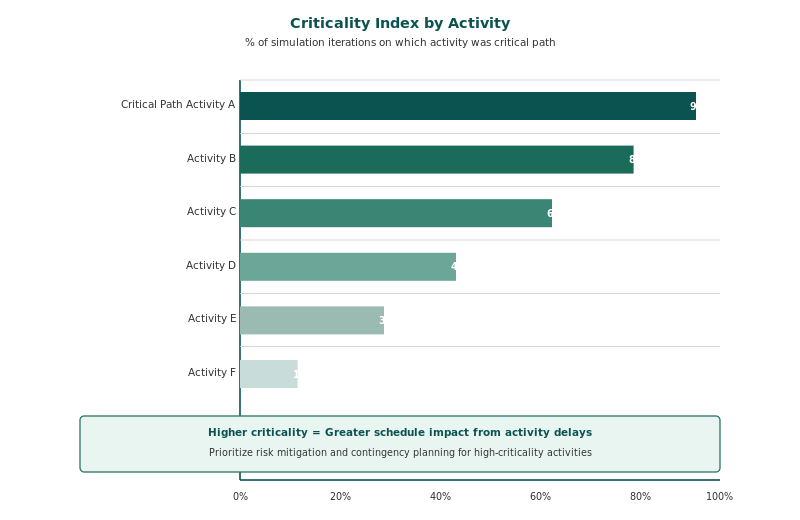
The tornado chart tells you which risks drive the most days. The criticality index tells you which activities are most often on the critical path during simulation. When an activity appears as both a top tornado driver AND has a high criticality index (above 70%), it is a priority-one mitigation target.
IQRM recommended practice: Never present a tornado chart without the criticality index alongside it. The two analyses together give the full picture: the tornado shows impact magnitude, and the criticality index shows critical path frequency. An activity with high tornado impact but low criticality might be absorbable by float. An activity with moderate tornado impact but very high criticality is a genuine bottleneck.
Sensitivity Analysis Methods: Single Pass vs. Multiple Pass
Not all sensitivity analysis is created equal. The method you choose affects the accuracy of your tornado chart.
Single Pass tests each variable independently while holding all others at their expected value. It is fast and easy to interpret, but it ignores interactions between correlated variables.
Multiple Pass varies all variables simultaneously across multiple iterations, then uses regression analysis to isolate each variable's contribution. It captures interaction effects and produces more realistic rankings when correlation is present.
| Method | Speed | Accuracy with Correlation | Best For |
|---|---|---|---|
| Single Pass | Fast | Lower (ignores interactions) | Simple models, quick screening, executive presentations |
| Multiple Pass | Slower | Higher (captures interactions) | Complex models, correlated risks, detailed mitigation planning |
IQRM recommends running Single Pass first for a quick overview, then Multiple Pass for the definitive driver ranking that informs your mitigation budget.
The IQRM Risk Driver Prioritization Matrix
Identifying risk drivers is only useful if you translate the data into mitigation decisions. IQRM uses a structured prioritization matrix that combines tornado chart results with criticality data and mitigation feasibility.
The Matrix Works in Four Steps
1. Extract the top 10 drivers from the tornado chart with their day contributions.
2. Overlay criticality index data. For each driver, note the criticality percentage. This creates two columns: tornado impact (days) and criticality (%).
3. Classify each driver into one of four quadrants:
| Quadrant | Tornado Impact | Criticality | Action |
|---|---|---|---|
| Priority 1: Critical Drivers | High (top 3) | High (>70%) | Mitigate immediately. These are driving the finish date and sitting on the critical path. |
| Priority 2: High Impact, Off-Path | High (top 3) | Low (<40%) | Monitor closely. High impact but currently absorbed by float. If float erodes, these become critical. |
| Priority 3: Path-Dependent | Moderate (4-7) | High (>70%) | Investigate. These are on the critical path frequently but contribute moderate days. |
| Priority 4: Background Noise | Low (8+) | Low (<40%) | Accept. Minimal schedule variance and rarely critical. Document and move on. |
4. Estimate mitigation ROI for Priority 1 and 2 items. Run a post-mitigation scenario in your QSRA tool (Safran Risk, Argo, or similar) to compare the pre-mitigation and post-mitigation S-curves.Real-world example from IQRM's project experience:
On a GCC petrochemical project, the tornado chart showed "long-lead valve procurement" as the #1 driver at 22 days. The criticality index confirmed it was on the critical path in 85% of iterations.
The mitigation (air freight from Europe instead of sea freight) cost $180,000 but recovered 19 days at P80. The client's delay penalty was $50,000 per day.
The ROI was immediate: $180K spent to avoid $950K in potential penalties. Without the tornado chart, this would have been a gut-feel decision. With it, it was a data-driven investment.
Common Mistakes When Interpreting Tornado Charts
Even experienced practitioners misread tornado charts. Here are the pitfalls IQRM sees most often in project reviews.
Mistake 1: Treating the Tornado as a Risk Register
The tornado chart ranks contributions to schedule variance, not risk severity. A risk with catastrophic consequences but very low probability may not appear in the top 10 because the expected value (probability multiplied by impact) is small. The risk register still matters for those low-probability, high-consequence events.
Mistake 2: Ignoring Correlation Effects
If you used Single Pass sensitivity and your model has significant correlation, the tornado ranking may be misleading. Correlated risks that individually show moderate impact may collectively drive the schedule more than the top-ranked independent risk. Always check whether correlation is modeled and whether Multiple Pass was used.
Mistake 3: Mitigating the Wrong Driver Type
If the top tornado driver is an activity duration uncertainty (not a discrete risk event), the solution is not risk mitigation in the traditional sense. It is improving the quality of the estimate: narrowing the min/max range through better data, breaking the activity into smaller components, or getting a specialist estimate.
Mistake 4: Presenting the Tornado Without Context
A tornado chart shown to an executive without the S-curve and criticality index is incomplete. The executive needs to see: (1) the probability of meeting the deadline (S-curve), (2) what is driving the risk (tornado), and (3) where the critical path sits (criticality). All three together tell the story.
How Sensitivity Analysis Connects to Mitigation ROI
The ultimate purpose of sensitivity analysis is not to produce a chart. It is to answer the question: "Where should we spend money to buy back schedule?"
After identifying Priority 1 drivers from the IQRM Risk Driver Prioritization Matrix, the next step is running a post-mitigation Monte Carlo scenario. This involves:
1. Locking the random seed (so both runs use the same random numbers for a fair comparison)
2. Running the pre-mitigation model and recording the P80 finish date
3. Adding the proposed mitigation actions to the model (reducing probability, narrowing impact ranges, or adding mitigation cost as a new activity)
4. Running the post-mitigation model and recording the new P80 finish date
5. Calculating the shift: Pre-mitigation P80 minus Post-mitigation P80 = days recovered
This comparison produces an overlay of two S-curves. The gap between them is the measurable value of your mitigation investment. IQRM recommends presenting this overlay to decision-makers because it translates abstract risk into concrete schedule recovery.
For a detailed guide on how P-values like P50, P80, and P90 work and how to choose the right one for your project, see IQRM's guide on P50 vs P80 vs P90: How to Choose the Right Confidence Level.
Tools That Produce Schedule Risk Tornado Charts
Tornado charts are a standard output of all major QSRA tools. Here is how they compare:
| Tool | Sensitivity Methods | Criticality Index | Pre/Post Overlay |
|---|---|---|---|
| Safran Risk | Single Pass, Multiple Pass | Yes | Yes |
| Primavera Risk Analysis | Single Pass | Yes | Limited |
| @RISK (Palisade) | Regression-based | No (manual setup) | Yes |
| Argo Monte Carlo | Single Pass, Multiple Pass | Yes | Yes |
For a step-by-step walkthrough of running Monte Carlo simulations, including how to set up the model that produces these tornado charts, see IQRM's complete guide on Schedule Risk Analysis (QSRA).
If you prefer to build a basic sensitivity model in a spreadsheet first, IQRM's Monte Carlo Simulation in Excel tutorial walks through the process with a free downloadable template.
Frequently Asked Questions
What is sensitivity analysis in schedule risk?
Sensitivity analysis in schedule risk is the process of measuring how much each individual risk or activity uncertainty contributes to the total project schedule variance after a Monte Carlo simulation. It produces a ranked tornado chart showing which variables drive the most days of delay, enabling teams to prioritize mitigation where it has the greatest impact.
What is a tornado chart in risk analysis?
A tornado chart is a horizontal bar chart that ranks risk drivers from highest to lowest impact on the project outcome. In schedule risk analysis, each bar shows how many days a specific risk or activity uncertainty contributes to the total finish date spread. The name comes from the characteristic shape: wide bars at the top narrowing to small bars at the bottom.
How do you read a tornado chart from a Monte Carlo simulation?
Read from top to bottom. The top bar is the single largest contributor to schedule variance. The bar length shows days of impact. Look for the drop-off point where major drivers transition to minor ones. Cross-reference with the criticality index to confirm whether high-impact items are also on the critical path.
Is a tornado diagram the same as a sensitivity analysis?
Not exactly. Sensitivity analysis is the analytical method. The tornado diagram is the visualization of the results. Sensitivity analysis calculates each variable's contribution to the outcome; the tornado diagram displays those contributions as ranked horizontal bars. You cannot have a meaningful tornado diagram without running a sensitivity analysis first.
What is the difference between Single Pass and Multiple Pass sensitivity?
Single Pass tests each variable independently while holding others constant. Multiple Pass varies all variables simultaneously and uses regression to isolate contributions. Single Pass is faster but ignores interactions between correlated risks. Multiple Pass is more accurate for models with correlation but takes longer to compute.
How many risk drivers should I focus on for mitigation?
IQRM recommends focusing on the top 5 to 7 drivers that appear in both the tornado chart's highest-impact positions and the criticality index above 70%. These typically account for 60-80% of total schedule variance. Spreading mitigation budget across all identified risks dilutes the impact and wastes resources.
What is the criticality index and how does it relate to the tornado chart?
The criticality index shows how often each activity was on the critical path during Monte Carlo simulation, expressed as a percentage. An activity with 85% criticality was on the critical path in 85% of iterations. The tornado chart shows impact magnitude; the criticality index shows path frequency. Together, they identify the true bottlenecks.
Can sensitivity analysis show me the ROI of risk mitigation?
Yes. Run a pre-mitigation and post-mitigation Monte Carlo with the same random seed. The shift between the two S-curves at P80 shows the days recovered. Divide the mitigation cost by days recovered to get cost-per-day-saved. This is the most defensible way to justify mitigation investment to stakeholders.
Take the next step. If your team runs Monte Carlo simulations but struggles to turn the outputs into mitigation priorities, IQRM's QRM Professional Diploma teaches the complete workflow: from building the risk model to interpreting sensitivity results and presenting data-driven recommendations to decision-makers.
Learn more about the QRM Diploma →
Tornado charts are a key output of Schedule Risk Analysis (QSRA). Learn the full methodology in our complete guide.
IQRM, the Institute of Qualified Risk Managers, is a specialist institute in quantitative risk management, delivering Quantitative Schedule Risk Analysis (QSRA), Quantitative Cost Risk Analysis (QCRA) and Monte Carlo simulation training and consulting to major capital projects across the United Kingdom, Saudi Arabia and the UAE.
QRM Training
Consulting
Knowledge Hub
QSRA on UK Major Projects
London, United Kingdom
IQRM Project Management Consultancy Ltd
128 City Road, London, EC1V 2NX
info@iqrm.net
QSRA Training UK
Dubai office, UAE
Rolex Tower, Sheikh Zayed Road, Dubai
+971 50 362 5784
QSRA Training UAE
Saudi Arabia
Riyadh delivery for giga-projects and Vision 2030 programmes.
QSRA Training Saudi Arabia
info@iqrm.net
IQRM Project Management Consultancy Ltd is registered in England and Wales, company number 17523501. Registered office: 128 City Road, London, EC1V 2NX, United Kingdom.