
Most project schedules promise a single completion date as if the future were certain. Then reality arrives: procurement delays stack up, weather windows close early, subcontractor productivity drops, and that confident finish date quietly slips by three months. The gap between what the schedule says and what actually happens is where projects lose money, credibility, and stakeholder trust.
New · Self-Paced Course
Want to build a full Primavera Risk model yourself? Learn it hands-on in 20 lessons — from XER import to reading the S-curve and tornado chart. £75 £29
Primavera Risk Analysis is Oracle's Monte Carlo simulation tool for modeling schedule risk and cost risk on projects. It imports Primavera P6 schedules, applies probability distributions and discrete risk events, and runs thousands of iterations to produce confidence levels (P50, P80, P90) instead of a single deterministic finish date.
For project controls professionals and risk analysts working in oil and gas, EPC, infrastructure, and construction, Primavera Risk Analysis (also known as Pertmaster) has been a foundational tool for over two decades. Understanding how it works, what it can deliver, and where its real limitations lie is essential for anyone performing or commissioning a quantitative schedule risk analysis today.
This guide covers everything a practitioner needs to know about Primavera Risk Analysis: how it works step by step, how it compares to Safran Risk, what its limitations mean for your projects, and how to get defensible results from it.
What Is Primavera Risk Analysis?
Primavera Risk Analysis (PRA) is Oracle's dedicated risk analytics application for project schedules and cost estimates, formerly known as Pertmaster before Oracle acquired it in 2008. It sits alongside Primavera P6 in the Oracle project controls ecosystem, adding a probabilistic layer to deterministic scheduling.
Where P6 produces one set of dates based on activity logic and durations, PRA stress-tests those dates against uncertainty and risk to reveal the full range of possible outcomes. The tool supports both qualitative risk analysis (risk registers with probability and impact scoring) and quantitative risk analysis (Monte Carlo simulation of schedule and cost models). For QSRA practitioners, PRA's core value is its ability to import a P6 XER file, apply three-point duration estimates and discrete risk events, run a Monte Carlo simulation, and produce S-curves, tornado charts, and confidence level reports.
PRA also includes decision tree analysis, risk register management, reporting templates, and probabilistic calendar modeling for weather risks. It can run both pre-mitigation and post-mitigation scenarios, allowing practitioners to compare risk exposure before and after proposed response strategies and calculate the return on investment for each action.
How Primavera Risk Analysis Works: The QSRA Workflow
A quantitative schedule risk analysis in PRA follows a structured, repeatable process. IQRM teaches a seven-phase QSRA methodology that applies regardless of which tool you use, but the steps below show how each phase maps to Primavera Risk Analysis specifically.

Step 1: Import Your P6 Schedule
PRA reads native Primavera P6 files (XER format) and Microsoft Project files (MPP/XML). Before exporting from P6, always recalculate the schedule (F9) to ensure dates are current. After import, PRA runs a verification check comparing early start and finish dates against the source file. Any mismatch typically means the schedule was not recalculated before export, a common mistake that invalidates the entire analysis if left uncorrected.
Step 2: Run the Schedule Health Check
PRA includes built-in schedule health diagnostics, and this step is non-negotiable. A schedule that is not dynamically responsive to simulated changes will produce meaningless results. IQRM recommends checking four critical areas before proceeding with any simulation.
Hard constraints lock activity dates and prevent the simulation from shifting them realistically. Remove "Finish No Later Than" and similar constraints, or the model cannot reflect how delays propagate through the network.
Excessive lags and leads fixate activities in place. Replace them with dummy activities so that uncertainties and risks can be assigned and their effects simulated through the network.
Open-ended logic breaks the critical path. Every activity must have both a predecessor and a successor (except the project start and finish milestones) to maintain a continuous path through the network.
Overuse of SS/FF relationships creates hammock behavior where activities jiggle uncontrollably without fixed start or end dependencies. Reduce these to maintain schedule integrity under simulation.
Step 3: Assign Duration Uncertainty
Apply three-point estimates (minimum, most likely, maximum) to activity durations. These represent the business-as-usual estimation uncertainty inherent in every activity, and they carry a 100% probability of occurring because every duration has some range of variability. PRA supports multiple probability distributions for these estimates: Triangle, PERT/BetaPERT, Uniform, Lognormal, and Normal.
IQRM recommends selecting the distribution based on data sufficiency. Use Triangle when you have limited data (three data points at most). Use PERT when you have moderate confidence in the most likely value and want to weight the distribution toward it. Use Lognormal when historical data shows right-skewed outcomes, which is common for construction and procurement durations where delays are more frequent than early completions. Limit each activity to one estimated uncertainty assignment to avoid redundant compounding of the same variability.
Step 4: Map Discrete Risk Events
Discrete risks are specific events that may or may not occur, each with a defined probability of less than 100%. PRA models these using Bernoulli distributions (single occurrence) or Binomial and Poisson distributions (repeated events at a frequency). Each risk event is mapped to specific schedule activities with a defined impact on duration or cost.
PRA supports both series mapping (delays are consecutive and cumulative) and parallel mapping (delays happen concurrently, with only the longest driving the finish date). For weather-related risks, PRA offers probabilistic calendar modeling that generates simulated non-working days directly into activity calendars, avoiding the double-counting that occurs when weather is modeled as both a calendar adjustment and a productivity factor.
Step 5: Configure and Run the Monte Carlo Simulation
Set the iteration count between 5,000 and 10,000 for statistical stability. Lock the random seed (typically at 0 or 1) so results are reproducible across comparison runs. PRA supports Latin Hypercube Sampling for more efficient coverage of the probability space in large models, and convergence monitoring that can stop the simulation automatically once the mean and key percentiles stabilize within a defined tolerance.
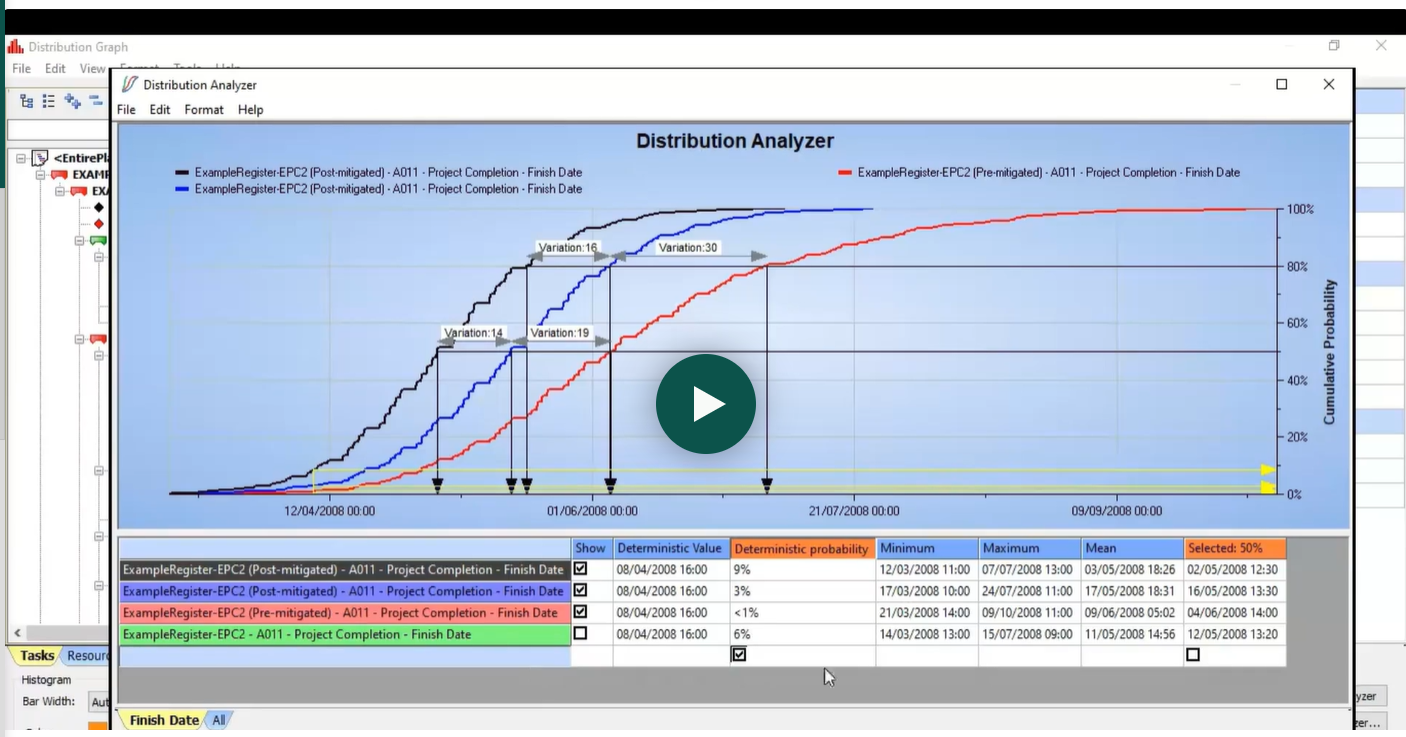
IQRM recommends running the model twice: first as a pre-mitigation analysis to establish baseline risk exposure, then as a post-mitigation analysis with proposed response strategies applied. The post-mitigation run must account for the cost of implementing each response while simulating the targeted reduction in probability or impact. Comparing the two S-curves gives decision-makers a clear picture of what risk responses actually buy them in schedule terms.
Step 6: Interpret the Results
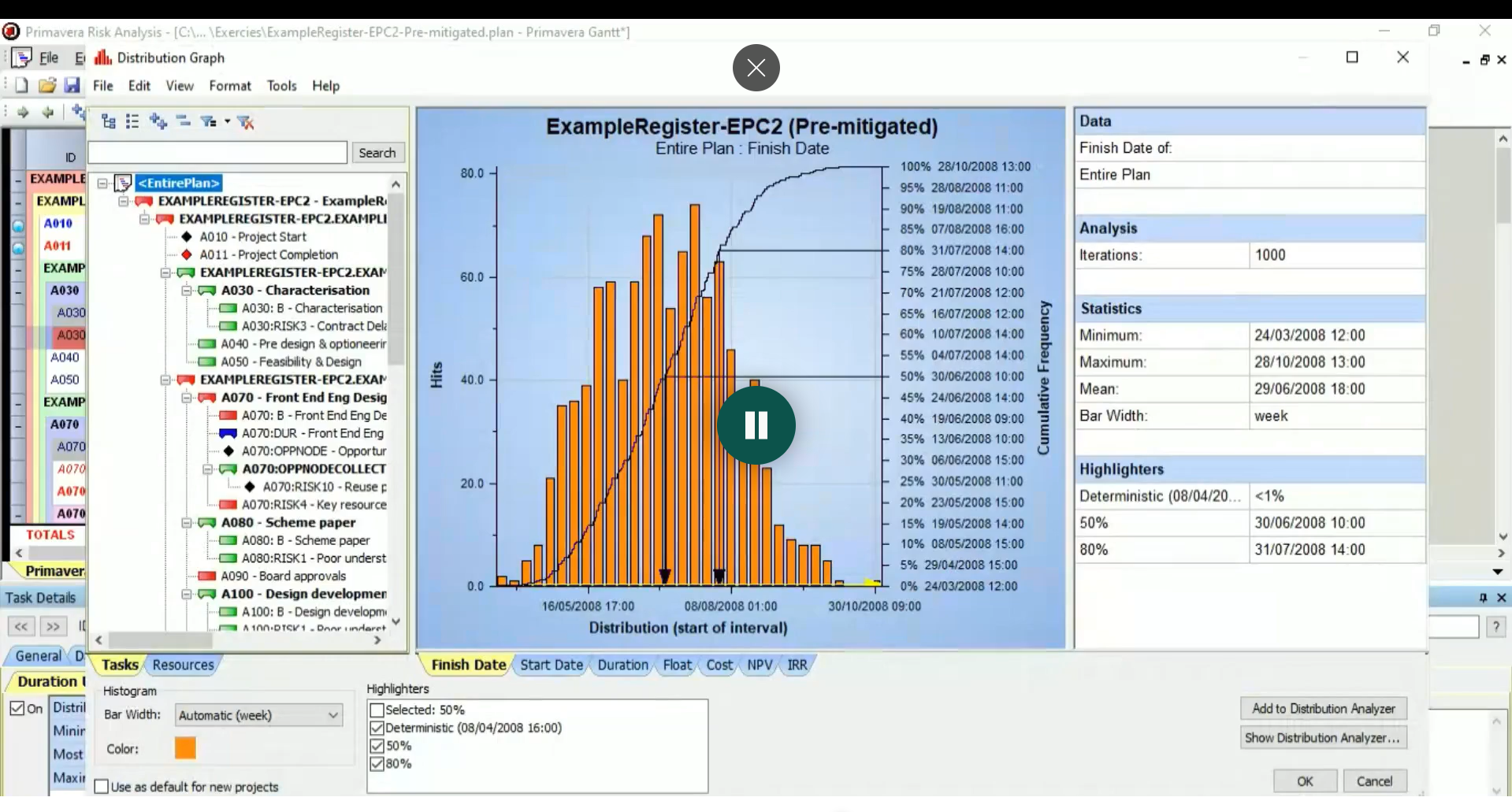
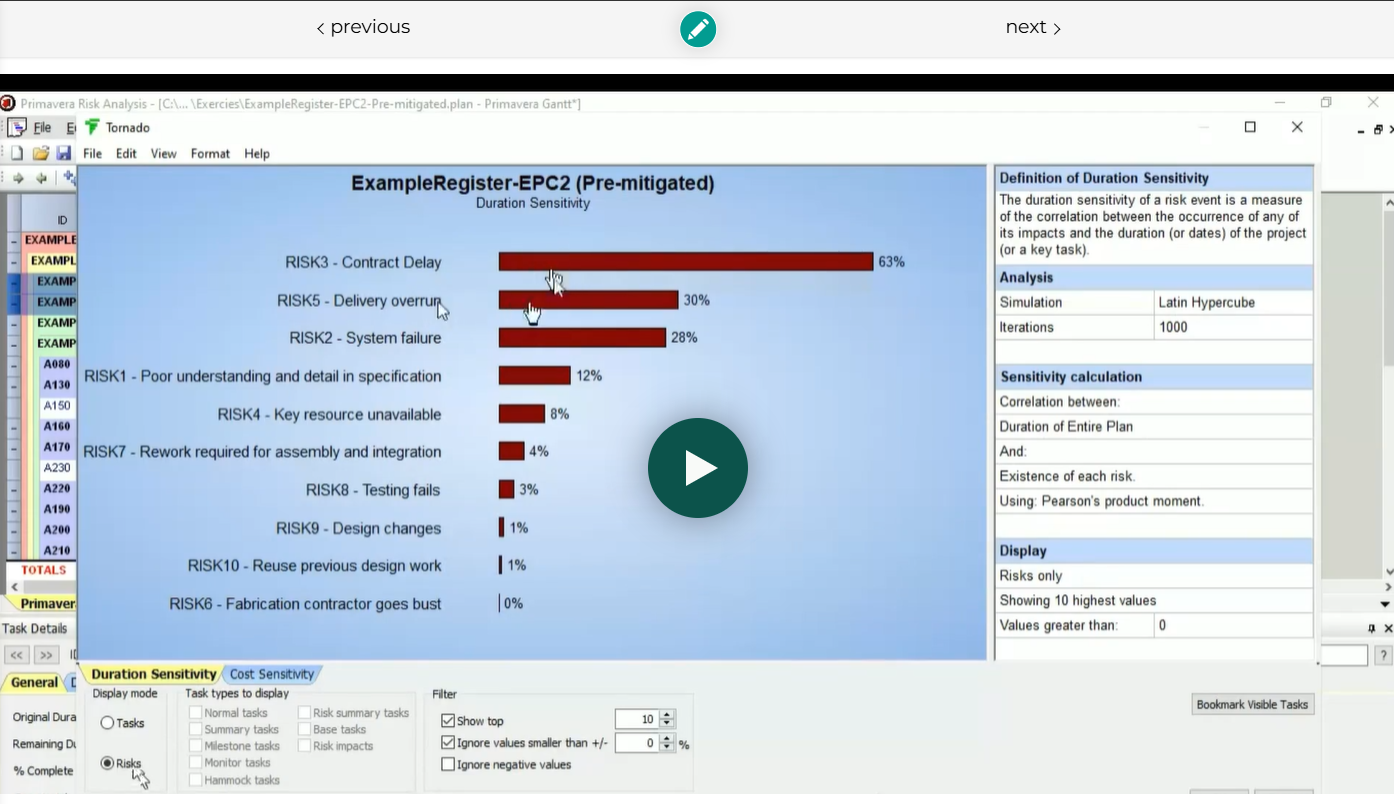
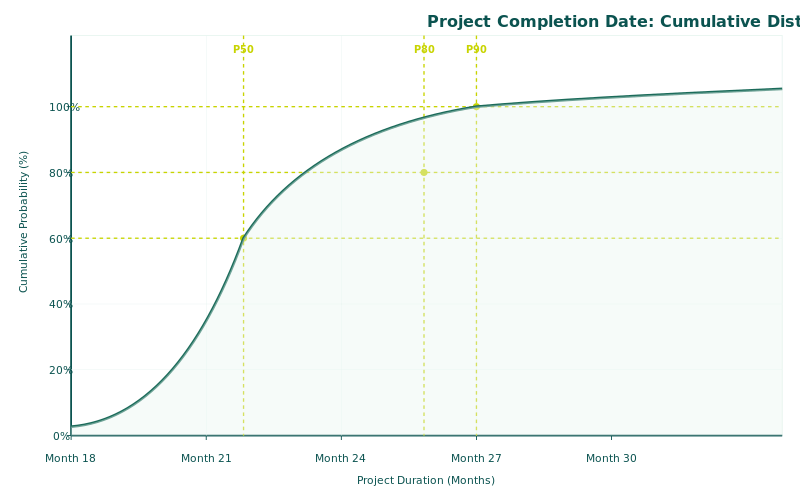
PRA produces several standard output reports that form the basis of any QSRA deliverable. The Probability Density Function (histogram) shows the frequency distribution of simulated completion dates. The Cumulative Distribution Function (S-curve) shows the probability of finishing on or before any given date, with P50, P80, and P90 confidence levels clearly marked. The tornado chart ranks individual risks and activities by their contribution to total schedule delay, identifying the critical risk drivers that should receive priority attention and mitigation investment. The criticality index shows how often each activity appeared on the critical path across all iterations, revealing near-critical activities that deterministic analysis misses entirely.
Schedule Contingency = P80 Completion Date − Deterministic Completion Date
Learn Primavera Risk Analysis Hands-On
Build a complete schedule risk model, step by step
Our self-paced course takes you from importing a P6 XER file to running a full Monte Carlo simulation and reading the histogram, S-curve and tornado chart, all inside Primavera Risk Analysis. 20 recorded lessons, a free training-version licence, and exercises you submit.
£75 £29 · Lifetime access
Primavera Risk Analysis vs. Safran Risk: The IQRM Tool Comparison Matrix
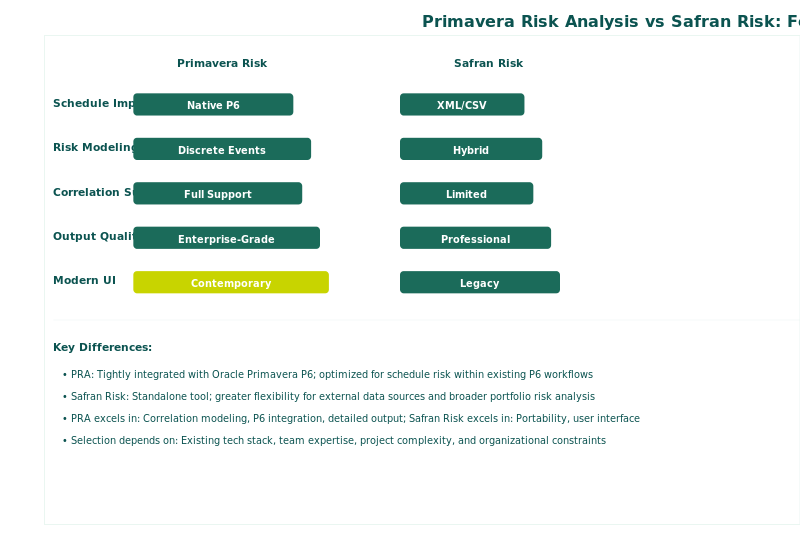
Practitioners frequently ask IQRM which tool to use for schedule risk analysis. The answer depends on your organizational context, model complexity, and analytical requirements. The table below compares the two most widely used QSRA platforms across the criteria that matter to working risk analysts.
| Feature | Primavera Risk Analysis | Safran Risk |
|---|---|---|
| Architecture | 32-bit, single-user, file-based | 64-bit, multi-user, database backend |
| Development Status | Controlled Availability (last major update 2013) | Actively developed with regular releases |
| P6 Integration | Native XER import | Native XER import |
| JCL Analysis | Limited cost-schedule integration | Full JCL scatter plot with integrated modeling |
| Correlation | Basic correlation support | Pearson coefficients with Risk Driver Method |
| Resource Leveling | Not supported post-iteration | Post-iteration resource leveling supported |
| Large Model Performance | Struggles above ~10,000 activities | Handles large schedules efficiently |
| Multi-User Access | Single-user only (file-based) | Concurrent multi-user via database |
| Weather Modeling | Probabilistic calendars | Calendar risk simulation |
| Typical User Base | Organizations in the Oracle ecosystem | Specialist risk firms and major projects |
Both tools perform Monte Carlo simulation for schedule risk analysis. The choice often depends on organizational context. If your organization already runs Primavera P6 and holds Oracle enterprise licenses, PRA may be the path of least resistance for basic QSRA. If you need Joint Confidence Level analysis, advanced correlation modeling, or are running models with large schedules, Safran Risk is the industry-leading option. IQRM recommends Safran Risk as the primary tool for professional-grade QSRA and QCRA, but teaches a tool-agnostic methodology that applies to any Monte Carlo simulation platform. You can explore how IQRM applies this methodology in Safran Risk in our detailed guide: Schedule Risk Analysis (QSRA) with Safran Risk in 2026.
The Limitations Every Practitioner Should Know
PRA has been a reliable workhorse for many organizations, but practitioners should understand its constraints before committing to it for complex analysis. These are not theoretical concerns; they affect real project outcomes.
Development has effectively stopped. Oracle placed PRA on Controlled Availability status. The last significant update was in 2013, with the last patch issued in 2015. This means no new features, no modern UI improvements, and diminishing vendor support. Oracle's risk management investment has shifted to Primavera Cloud, which is a fundamentally different product with different capabilities and architecture.
The 32-bit architecture limits performance. PRA is a 32-bit application that cannot leverage more than approximately 4 GB of RAM. For schedules exceeding roughly 10,000 activities with complex risk models, performance degrades significantly. Modern projects, particularly in oil and gas and mega-infrastructure, routinely exceed this threshold.
No database backend means single-user operation. PRA stores data in local files, not a shared database. This prevents concurrent multi-user access, making it impractical for large teams collaborating on risk models simultaneously. Moving reports and layouts between models is cumbersome and error-prone.
Joint Confidence Level analysis is limited. PRA does not offer the integrated cost-schedule scatter plot that modern contingency sizing demands. As IQRM explains in detail in our guide on Joint Confidence Level (JCL): Why P80 on Cost and P80 on Schedule Does Not Mean P80 on Both, achieving P80 on cost and P80 on schedule independently does not mean achieving P80 on both simultaneously. This is a critical insight for sanction decisions that PRA cannot deliver natively.
When to Use Primavera Risk Analysis (and When Not To)
PRA remains a viable option in specific organizational contexts, and IQRM does not advise abandoning it without reason. The right tool depends on what you need to achieve.
IQRM recommends PRA when your organization already holds Oracle Primavera licenses and the native P6 integration simplifies your workflow, when the project schedule contains fewer than 5,000 activities, when the analysis scope covers schedule risk without requiring integrated cost-schedule modeling, and when budget constraints make investing in a dedicated tool like Safran Risk impractical for a single project.
IQRM recommends upgrading beyond PRA when you need JCL analysis for integrated cost and schedule contingency sizing, when your models exceed 10,000 activities, when multiple analysts require concurrent access to the same risk model, or when you need advanced correlation modeling using the Risk Driver Method rather than basic coefficient entry.
The methodology matters more than the tool. A well-structured QSRA using PRA with clean schedule logic, data-driven distributions, and proper risk mapping will produce better results than a poorly executed analysis in any premium software. IQRM's complete guide to the methodology is available here: Schedule Risk Analysis (QSRA): Guide to Monte Carlo + Examples.
Best Practices for Getting Reliable Results from PRA
Regardless of the tool, the quality of a QSRA depends on the discipline of the practitioner. These five practices, drawn from IQRM's consulting experience across oil and gas, EPC/EPCM, and infrastructure projects, separate credible analyses from misleading ones.
First, fix your schedule before running the simulation. Remove hard constraints, resolve lags, and close open-ended logic. A schedule that is not dynamically responsive will produce misleading results regardless of how sophisticated your risk model is.
Second, ground your three-point estimates in data, not opinion. IQRM's Risk Data Engine (RDE) methodology provides a systematic five-step framework for collecting historical project data, fitting it to probability distributions, and feeding those parameters directly into the simulation tool. Without a data foundation, your Monte Carlo analysis is an opinion with a histogram attached.
Third, never skip correlation. Uncorrelated risk models produce artificially narrow S-curves because they assume all uncertainties are independent. In reality, if one work package overruns, related packages typically overrun too. Apply Pearson correlation coefficients between related activities to produce realistic variance in your results. IQRM covers this in depth in our guide on Risk Correlation in Schedule Risk Analysis: Why It Changes Everything.
Fourth, run pre-mitigation and post-mitigation scenarios. The pre-mitigation run shows your raw risk exposure. The post-mitigation run shows the effect of proposed responses, including their cost. Comparing the two S-curves gives decision-makers a defensible business case for investing in specific risk actions.
Fifth, document every assumption. Record which distribution you selected for each activity, what data source informed the three-point estimate, and why you chose specific correlation coefficients. Without this traceability, the model cannot be defended under stakeholder scrutiny or audit.
Frequently Asked Questions
What is Primavera Risk Analysis?
Primavera Risk Analysis (PRA) is Oracle's Monte Carlo simulation tool for modeling schedule and cost uncertainty on projects. It imports Primavera P6 schedules, applies probability distributions and discrete risk events to activities, and produces confidence-level forecasts (P50, P80, P90) through thousands of simulation iterations.
How do you run a Monte Carlo simulation in Primavera Risk Analysis?
Import your P6 schedule as an XER file, run the schedule health check to remove constraints and fix logic, assign three-point duration estimates and discrete risk events to activities, set the simulation to 5,000 to 10,000 iterations with a locked random seed, and run the analysis. PRA produces S-curves, tornado charts, and criticality reports.
What is the difference between Primavera Risk Analysis and Safran Risk?
PRA is a 32-bit, file-based application with development paused since 2013. Safran Risk is a modern 64-bit, database-backed tool with active development, advanced correlation modeling via the Risk Driver Method, and full Joint Confidence Level (JCL) analysis for integrated cost-schedule contingency sizing.
Is Oracle Primavera Risk Analysis discontinued?
Oracle has placed PRA on Controlled Availability status, meaning it is no longer actively developed or marketed, though existing licenses remain supported. Oracle's risk management investment has shifted to Primavera Cloud, a separate cloud-based platform with different capabilities and architecture.
How do you import a P6 schedule into Primavera Risk Analysis?
Export the schedule from Primavera P6 as an XER file after recalculating (F9) to ensure all dates are current. In PRA, use the import function to load the XER file. After import, verify that early start and finish dates match the P6 source to confirm data integrity before proceeding with any risk assignments.
What are the limitations of Primavera Risk Analysis?
PRA's main limitations include its 32-bit architecture (restricts performance on large schedules), no database backend (single-user only), no integrated JCL analysis for cost-schedule contingency sizing, paused development since 2013 with Controlled Availability status, and limited correlation modeling compared to modern tools like Safran Risk.
Can Primavera Risk Analysis perform cost risk analysis?
Yes, PRA supports cost risk analysis by modeling fixed-cost uncertainty, variable-cost uncertainty, and resource uncertainty on activities. However, it cannot perform truly integrated cost-schedule risk analysis (JCL) at the level required for modern contingency sizing and sanction decisions on major capital projects.
What is Pertmaster?
Pertmaster was the original name of the schedule risk analysis software before Oracle acquired it in 2008 and rebranded it as Primavera Risk Analysis. Many practitioners and organizations still refer to PRA as Pertmaster, particularly those who have used the tool since before the acquisition.
IQRM delivers specialist training and consulting in quantitative schedule risk analysis, Monte Carlo simulation, and risk-based forecasting. Our QRM Diploma programme equips professionals with the practical skills to build, run, and interpret QSRA models on real projects, regardless of which software platform they use.
Written by Rami Salem, Quantitative Risk Management specialist with 15+ years of experience across oil and gas, EPC/EPCM, and infrastructure projects.
Primavera Risk Analysis is one tool for conducting Schedule Risk Analysis (QSRA). Our complete QSRA guide covers the methodology that applies regardless of which tool you use.
Ready to Build Your Own Model?
Primavera Risk Analysis Course
Reading about the QSRA workflow is a start — but you learn it by doing. In 20 hands-on lessons you build the full model yourself on real project data, from XER import to a decision-ready output.
- ✓20 recorded, self-paced lessons with lifetime access
- ✓Free Primavera Risk Analysis training-version licence
- ✓Practical exercises you complete and submit for review
- ✓Read the histogram, S-curve and tornado chart with confidence
- ✓30-day, 100% money-back guarantee
£75 £29 · one-off, lifetime access
IQRM, the Institute of Qualified Risk Managers, is a specialist institute in quantitative risk management, delivering Quantitative Schedule Risk Analysis (QSRA), Quantitative Cost Risk Analysis (QCRA) and Monte Carlo simulation training and consulting to major capital projects across the United Kingdom, Saudi Arabia and the UAE.
QRM Training
Consulting
Knowledge Hub
QSRA on UK Major Projects
London, United Kingdom
IQRM Project Management Consultancy Ltd
128 City Road, London, EC1V 2NX
info@iqrm.net
QSRA Training UK
Dubai office, UAE
Rolex Tower, Sheikh Zayed Road, Dubai
+971 50 362 5784
QSRA Training UAE
Saudi Arabia
Riyadh delivery for giga-projects and Vision 2030 programmes.
QSRA Training Saudi Arabia
info@iqrm.net
IQRM Project Management Consultancy Ltd is registered in England and Wales, company number 17523501. Registered office: 128 City Road, London, EC1V 2NX, United Kingdom.