Written by Rami Salem, Quantitative Risk Management specialist with 15+ years of experience across Oil & Gas, EPC/EPCM, and infrastructure mega-projects.
Your project has a risk register. It probably has 50 to 200 risks, each rated High, Medium, or Low on a traffic-light matrix. The project team reviews it monthly, updates statuses, and presents a heat map to the steering committee. Everyone nods. Nothing changes.
The problem is not the risk register itself. The problem is that a qualitative risk register cannot answer the only question that matters: “How many days of delay and how many dollars of overrun should we actually plan for?” A heat map cannot calculate contingency. It cannot identify which risks drive the schedule. It cannot tell you where to spend mitigation budget for maximum impact.
Building a quantitative risk model is the process of converting your existing risk register into a Monte Carlo simulation that produces defensible, data-driven answers. It takes the same risks you have already identified and gives them numbers: probability distributions, schedule mappings, cost linkages, and correlation. The output is no longer a color on a chart. It is a probability distribution that tells you exactly how much contingency you need and where to focus your risk response.
This guide walks through the complete process of converting a qualitative risk register into a quantitative risk model, step by step.
Why Qualitative Risk Registers Fail Decision-Makers
Before building the quantitative model, it is worth understanding exactly why the current approach falls short.
The Problem with Heat Maps
A heat map ranks risks by combining probability and impact on a matrix (typically 5x5). The result is a color: red, amber, or green. This approach has three fundamental flaws:
Flaw 1: Equal rankings hide different risks. A risk with 80% probability and low impact can receive the same “amber” rating as a risk with 10% probability and very high impact. These risks require completely different responses, but the heat map treats them identically.
Flaw 2: You cannot add colors together. If you have 15 amber risks, what is the total project risk exposure? The heat map cannot answer this. Quantitative analysis can: each risk contributes a specific number of days or dollars, and the Monte Carlo simulation aggregates them into a total distribution.
Flaw 3: Heat maps cannot inform contingency. When the CFO asks “How much contingency should we hold?”, a heat map provides no answer. A Monte Carlo S-curve provides a precise answer at any confidence level: P50, P80, or P90.
Key insight: The qualitative risk register is not wrong. It is incomplete. The risks it identifies are real. What it lacks is the numerical precision to translate those risks into schedule and cost impact that executives can act on.
The Conversion Process: Seven Steps
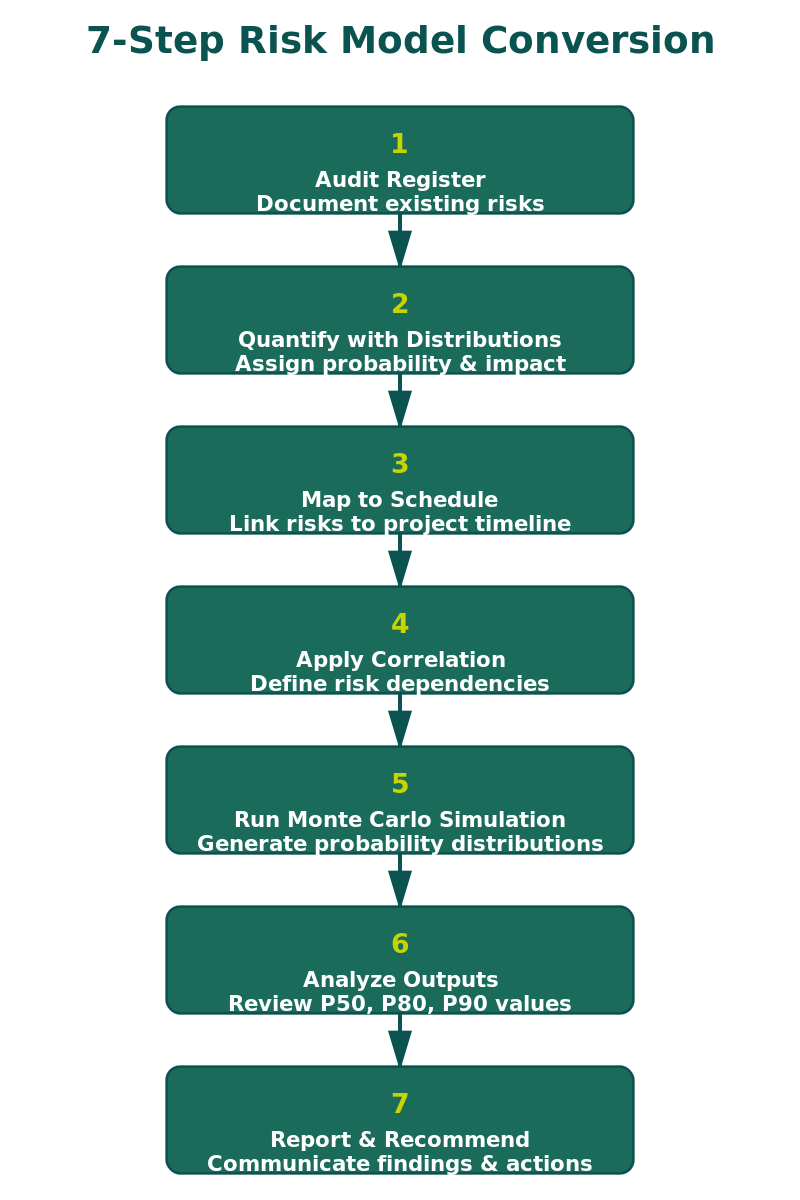
Step 1: Audit the Existing Register
Start by reviewing every risk in the current register. You are looking for three things:
Completeness: Are all significant risk categories covered? Check for gaps in procurement, subcontractor performance, regulatory/permitting, weather/site conditions, design maturity, and interface management.
Structure: Each risk should follow a three-part format: Root Cause (why it might happen), Threat or Opportunity (what could happen), and Effect (how it would impact the project).
Classification: Separate each risk into one of two types:
| Risk Type | Description | Probability |
|---|---|---|
| Estimated Uncertainty (BAU) | Inherent estimation inaccuracy in the baseline | 100% (always present) |
| Discrete Risk Event | A specific event that may or may not occur | Less than 100% |
This classification is critical because the two types are modeled differently in the Monte Carlo engine.
Step 2: Quantify Each Risk with Probability Distributions
This is where the register becomes a model. Every risk needs numerical parameters.
For Estimated Uncertainties (BAU): Assign a continuous probability distribution to the activity duration or cost element using a three-point estimate: Minimum (best realistic outcome), Most Likely (single-number plan value), and Maximum (worst realistic outcome).
| Data Available | Recommended Distribution |
|---|---|
| Three or more comparable data points | Triangle or PERT (fit to data) |
| Expert judgment only (no data) | Uniform (equal probability across the range) |
| Large dataset (30+ points) | Fit a Lognormal or Beta distribution |
For Discrete Risk Events: Assign a probability of occurrence (e.g., 40%) and an impact distribution (Triangle, PERT, or Uniform). In 10,000 iterations at 40% probability, the event will fire approximately 4,000 times.
Where do the numbers come from? IQRM’s Risk Data Engine (RDE) approach uses four data sources in order of reliability: historical project data, industry benchmarks, analogous project data, and structured expert judgment. A risk model without traceable data sources is an opinion with a histogram attached.
Step 3: Map Risks to the Schedule
Each quantified risk must be linked to specific activities in the project schedule (Primavera P6 or Microsoft Project). Each activity can have ONE estimated uncertainty and MULTIPLE discrete risk events mapped in series (delays add sequentially) or parallel (only the longest delay counts).
Getting this wrong inflates or deflates the schedule impact. IQRM’s rule of thumb: if risks could happen at the same time and you would only feel the longest one, use parallel mapping.
Step 4: Apply Correlation
Risks that share a root cause or common driver must be correlated in the model. Without correlation, the Monte Carlo engine assumes all risks are independent, which produces falsely narrow results. Group by: same contractor (0.5–0.7), same supply chain (0.6–0.8), same site conditions (0.3–0.5), and same regulatory body (0.5–0.7).
For a detailed guide, see IQRM’s guide on Correlation in Risk Models.
Step 5: Run the Monte Carlo Simulation
Import the risk-loaded schedule into your QSRA tool (Safran Risk, Argo Monte Carlo, or similar). Use minimum 5,000 iterations (10,000 preferred), Latin Hypercube sampling, and lock the random seed for comparison scenarios.
The simulation produces three primary outputs: the S-curve (read P50, P80, P90 directly), the Tornado chart (top 5–7 drivers account for 60%–80% of risk), and the Criticality index (how often each activity was on the critical path).
See IQRM’s guides on Sensitivity Analysis and Tornado Charts and P50 vs P80 vs P90 Confidence Levels.
Step 6: Validate and Calibrate
Before presenting results, validate the model: sanity check the S-curve against team expectations, check the tornado chart for surprises, compare with historical data (actual outcomes typically fall near P70–P90), and run boundary tests at minimum and maximum values.
Step 7: Build Mitigation Scenarios
The model’s greatest value is testing “what if” scenarios. For each Priority 1 driver: define the mitigation action, estimate cost, adjust risk parameters, re-run with the same seed, compare P80 values, and calculate days recovered per dollar spent. This produces a defensible mitigation ROI.
The Quantitative Risk Register: What Changes
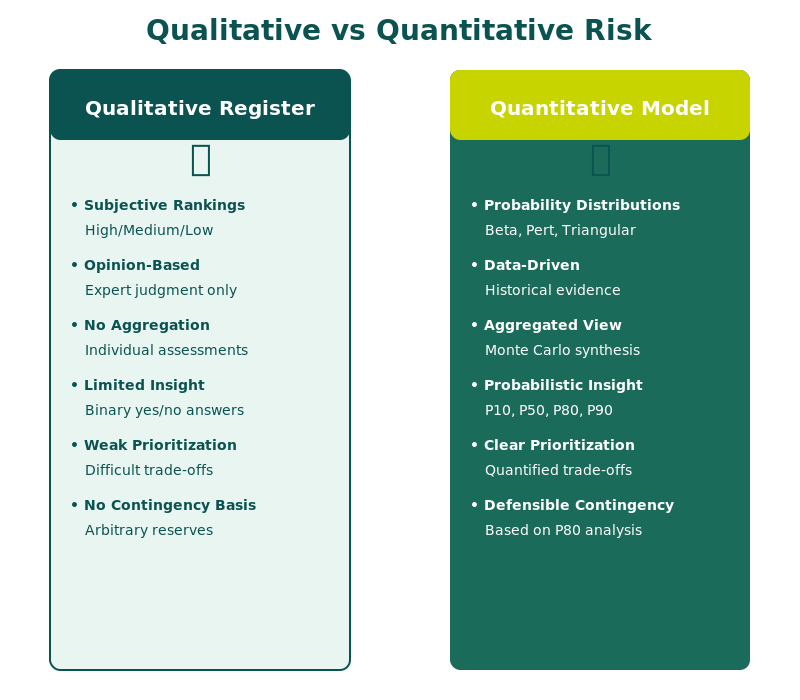
| Before (Qualitative) | After (Quantitative) |
|---|---|
| Probability: High/Medium/Low | Probability: 40% (Bernoulli) |
| Impact: High/Medium/Low | Impact: Triangle (8, 12, 20 weeks) |
| Ranking: Heat map color | Ranking: Tornado chart position (days contributed) |
| Contingency: “10% of budget” | Contingency: P80 minus deterministic = X days/dollars |
| Mitigation priority: Subjective | Mitigation priority: Cost per day recovered |
| Update cycle: Monthly status review | Update cycle: Re-run simulation after each major change |
Frequently Asked Questions
Can I convert an existing qualitative risk register into a quantitative model?
Yes. The qualitative register provides the risk identification, which is the hardest and most valuable step. The conversion adds numerical parameters (distributions, probabilities, mappings) to each risk. You do not need to start from scratch.
How long does the conversion take?
For a project with 50 to 100 risks, expect 2 to 4 weeks. This includes auditing the register, quantifying risks with RDE data, mapping to the schedule, and running initial simulations. Larger programs with 200+ risks may take 4 to 8 weeks.
What software do I need?
A QSRA tool that integrates with your scheduling software. Safran Risk is the industry standard for Oil & Gas and EPC. Argo Monte Carlo is a strong cloud-based alternative. Both handle risk mapping, correlation, and Monte Carlo simulation.
Do I still need the qualitative risk register after conversion?
Yes. The quantitative model runs on the same register. The register is the input; the Monte Carlo simulation is the processing engine; the S-curve and tornado chart are the outputs.
What is the minimum number of risks needed?
Models with fewer than 10 risks tend to be too sparse. Most project-level models have 30 to 80 risks. The key is completeness of coverage, not volume: 30 well-quantified risks produce better results than 150 poorly defined ones.
How often should I re-run the simulation?
At every major project milestone, after significant scope changes, and whenever new risk information emerges. Monthly updates are typical during execution.
Take the next step. If your project relies on a qualitative risk register and a heat map, you are making contingency and mitigation decisions without data. IQRM’s QRM Professional Diploma teaches the complete conversion workflow: from auditing your existing register to building and running the Monte Carlo model that replaces guesswork with defensible numbers.
Establish Instructor’s Presence
IQRM is a specialist institute for Quantitative Risk Management, delivering Quantitative Schedule Risk Analysis (QSRA), Quantitative Cost Risk Analysis (QCRA) and Monte Carlo simulation training and consulting to major capital projects across the United Kingdom, Saudi Arabia and the UAE.
QRM Training
Consulting
Knowledge Hub
QSRA on UK Major Projects
United Kingdom
QSRA & QCRA training and consulting for UK infrastructure, nuclear and energy programmes.
QSRA Training UK
rs@iqrm.net
United Arab Emirates
Rolex Tower, Sheikh Zayed Road, Dubai
+971 50 362 5784
QSRA Training UAE
Saudi Arabia
Riyadh delivery for giga-projects and Vision 2030 programmes.
QSRA Training Saudi Arabia
rs@iqrm.net