Primavera Risk Analysis Course
Self-paced course · 20 lessons · Primavera Risk Analysis
Build a complete schedule risk model in Primavera Risk Analysis.
A hands-on, self-paced course that takes you from importing a P6 XER file to running a full Monte Carlo simulation and reading the output, all inside Primavera Risk Analysis. You build the model yourself, lesson by lesson, step by step.
Lifetime access · Learn at your own pace · Was £75, now £29
The gap
Most planners can open Primavera Risk Analysis. Far fewer can build a complete risk model in it, from XER import all the way to the finished output.
Knowing where to click is not enough
The menus are easy to find. Knowing which uncertainty to apply, where, and why is the part that turns clicking around into an actual working risk model.
Bad inputs, dead model
A schedule that fails a health check, or risks scored without discipline, produces an output you cannot rely on. The model is dead before the simulation even runs.
Output you cannot read
An S-curve and a tornado chart are only useful if you can read them, the P50, the P80, and the top drivers. This course shows you exactly how, inside Primavera Risk.
How this course works
You build the model step by step, the way it is actually done in Primavera Risk Analysis.
This is not a menu tour. Each lesson builds one part of a working schedule risk model on real project data, in the order you would actually build it: import and validate the schedule, set the model up correctly, add duration uncertainty and risks, run the analysis, then read and format the output.
Because you learn the reasoning behind each step and not just the clicks, you finish able to build a Primavera Risk model on your own project, not just repeat the steps in this one. You understand what each setting does and why it matters.
Curriculum
Twenty lessons, three stages, one working model.
From a blank workspace to a formatted, decision-ready output. Every lesson is a hands-on step in building the same schedule risk analysis.
What you produce
The real outputs, built by your own hand.
Not slides about risk analysis. The histogram, the confidence S-curve, and the tornado chart, produced from your own Primavera Risk model.
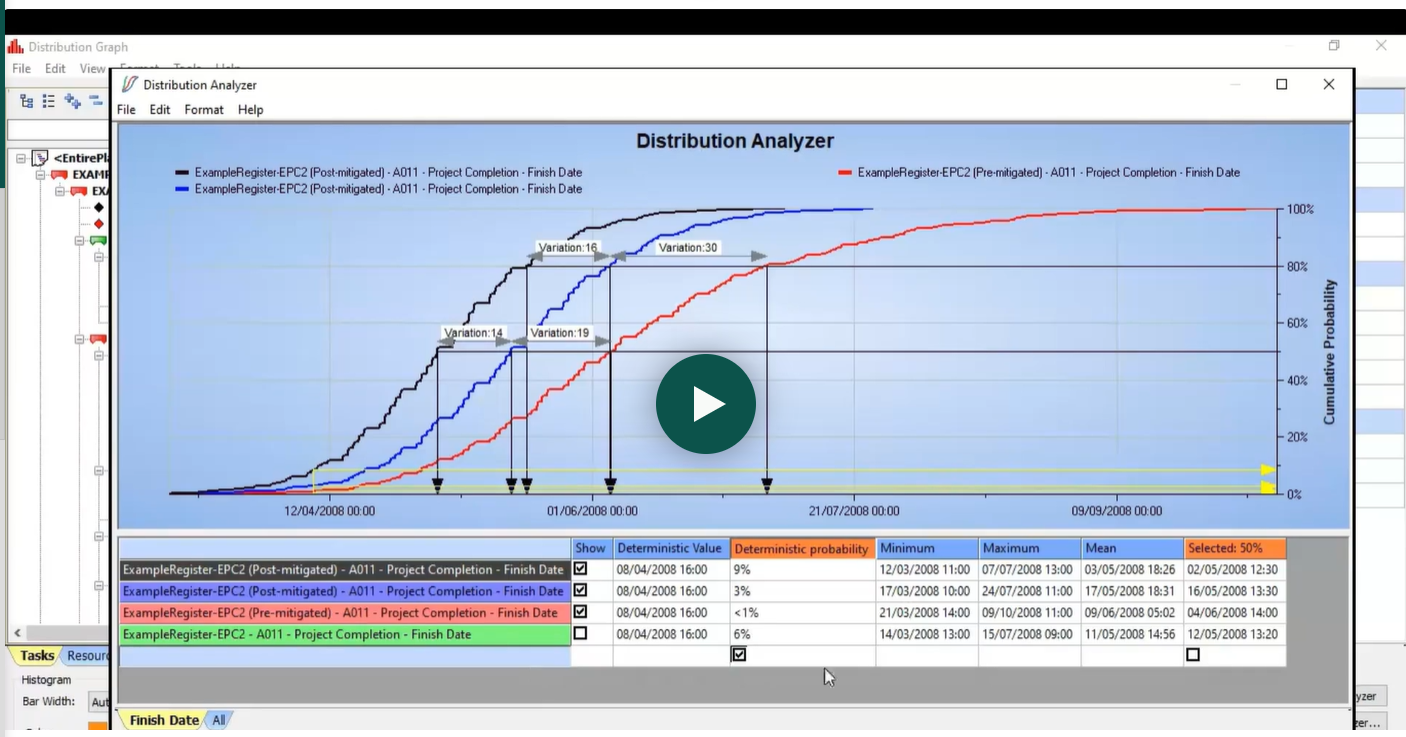
The confidence level, reading the finish date at P50, P80 and P90.
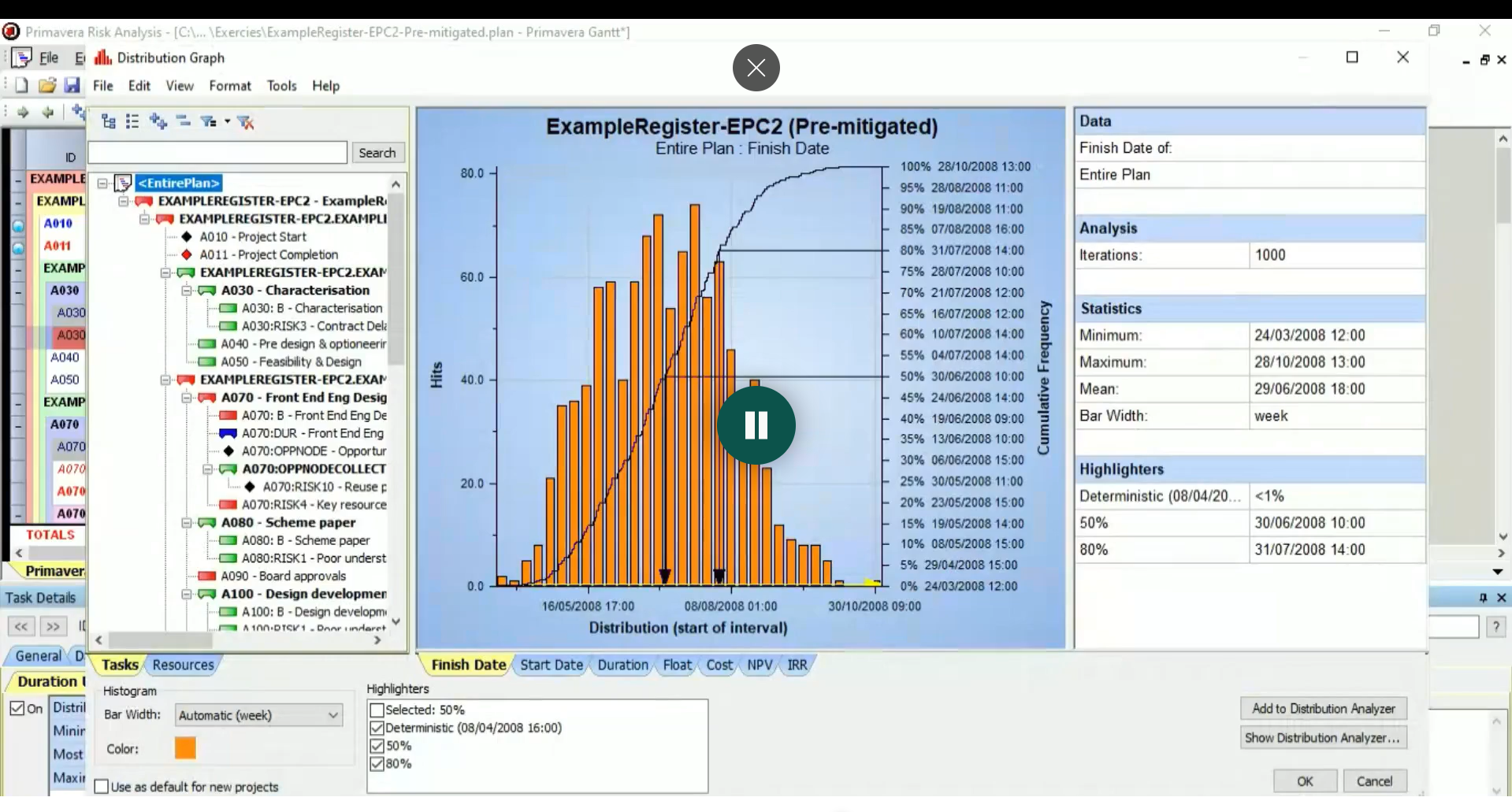
The probability distribution (PDF), showing where the schedule finish lands.
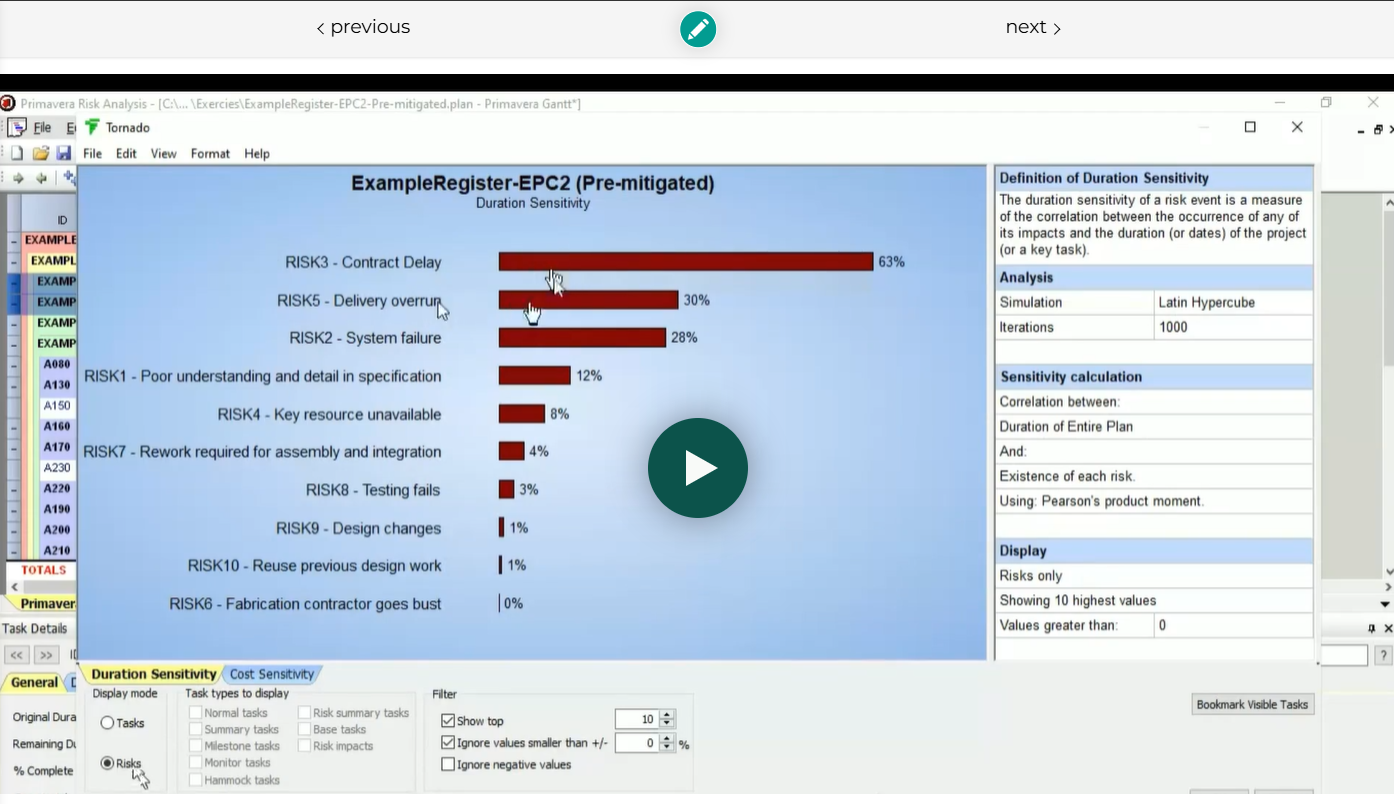
A real tornado chart from Primavera, ranking the risks to mitigate first.
Why this, not a menu tour
Build the model with understanding, not just clicks.
A typical software walkthrough
- Shows which buttons to press, in order
- You can repeat the steps, but not adapt them
- Skips the reasoning behind each setting
- Leaves you stuck the moment your project differs
- Ends with a model you cannot really read
This course
- Builds a full Primavera Risk model, end to end
- Explains the reasoning behind every step
- You understand what each setting does and why
- You can build the model on your own project after
- You read the histogram, S-curve and tornado yourself
What you will be able to do
From opening the tool to reading the output.
- Import a P6 XER file and validate the schedule before you trust it in a risk model.
- Run schedule and risk model health checks that catch the problems that quietly break an analysis.
- Apply duration uncertainty, quick risks, correlations and probabilistic branching with discipline, not guesswork.
- Build both a qualitative and a quantitative risk register and connect them to the model through an impact risk model.
- Run the Monte Carlo simulation and read the histogram, S-curve and tornado chart with confidence.
- Model weather windows and percentage lags and leads, then format a Gantt output ready to present.
Proof
Trusted by professionals across major programmes.
[TESTIMONIAL PLACEHOLDER · add a cleared graduate quote + name/role once you locate the feedback]
[TESTIMONIAL PLACEHOLDER · add a cleared graduate quote + name/role]
[TESTIMONIAL PLACEHOLDER · add a cleared graduate quote + name/role]
Your instructor

Rami Atef Salem, QRMCert
Rami has 15+ years in oil and gas risk management and is an Approved Consultant for both Saudi Aramco and ADNOC. He works in quantitative risk tools and Monte Carlo techniques every day, and has guided a large number of professionals through the move from qualitative to quantitative risk management.
You learn each step from someone who builds these models on real programmes, not from a textbook. Primavera Risk Analysis is one of several tools he uses in practice, and this course distils the way the work is actually done.
Investment
Everything in the course, at a self-paced price.
One-off · lifetime access · learn at your own pace
- All 20 recorded lessons, start to finish
- Every model-building step on real schedule data
- Histogram, S-curve and tornado chart walkthroughs
- Weather, correlation and branching techniques
- Lifetime access, learn and revisit any time
Was £75 · 30-day 100% money-back guarantee.
Download a free training version of Primavera Risk Analysis and follow every lesson hands-on. No paid licence needed to complete the course.
Practical exercises accompany the lessons. Work them on your own schedule, then submit your answers so your model-building is checked, not just watched.
30-day, 100% money-back guarantee.
Take the course, follow the lessons, try the exercises. If it is not right for you, email info@iqrm.net within 30 days of purchase and we will refund you in full, no questions asked. The risk sits with us, not you.
Questions
Frequently asked.
No. You can download a free training version of Primavera Risk Analysis and follow every lesson hands-on, at no extra cost. The whole course is built and taught inside Primavera Risk Analysis.
There are practical exercises alongside the lessons. You complete them in your own time and submit your answers, so your model-building is checked rather than only watched.
Yes. All 20 lessons are pre-recorded. You work through them in your own time and revisit any lesson whenever you need it, with lifetime access.
You are covered by a 30-day, 100% money-back guarantee. If you are not satisfied, email info@iqrm.net within 30 days of purchase and we will refund you in full, no questions asked.
No. The course teaches the probability you actually use in a schedule risk model, distributions, sampling and confidence levels, in the context of building the model. The only prerequisite is familiarity with project scheduling.
Yes. Across 20 lessons you go end to end inside Primavera Risk Analysis: importing and validating the P6 XER schedule, health checks, duration uncertainty, correlations, qualitative and quantitative risk registers, the impact risk model, running the analysis, and reading the histogram, S-curve and tornado chart.
A qualitative review ranks risks. This course teaches quantitative schedule risk analysis, producing confidence levels such as P50, P80 and P90, identifying the top drivers, and showing the impact of mitigation through Monte Carlo simulation.
A complete schedule risk model, run and interpreted: a validated schedule, duration uncertainty and risks applied, a risk register connected to the model, and the histogram, S-curve and tornado chart formatted for a decision.
Start today
Twenty lessons from a blank workspace to a finished Primavera Risk model.
Self-paced, lifetime access, free training-version licence. Was £75, now £29, with a 30-day money-back guarantee.
Approved Saudi Aramco vendor · ADNOC approved consultant · Built on the IQRM method
IQRM, the Institute of Qualified Risk Managers, is a specialist institute in quantitative risk management, delivering Quantitative Schedule Risk Analysis (QSRA), Quantitative Cost Risk Analysis (QCRA) and Monte Carlo simulation training and consulting to major capital projects across the United Kingdom, Saudi Arabia and the UAE.
QRM Training
Consulting
Knowledge Hub
QSRA on UK Major Projects
London, United Kingdom
IQRM Project Management Consultancy Ltd
128 City Road, London, EC1V 2NX
info@iqrm.net
QSRA Training UK
Dubai office, UAE
Rolex Tower, Sheikh Zayed Road, Dubai
+971 50 362 5784
QSRA Training UAE
Saudi Arabia
Riyadh delivery for giga-projects and Vision 2030 programmes.
QSRA Training Saudi Arabia
info@iqrm.net
IQRM Project Management Consultancy Ltd is registered in England and Wales, company number 17523501. Registered office: 128 City Road, London, EC1V 2NX, United Kingdom.